

Intro :
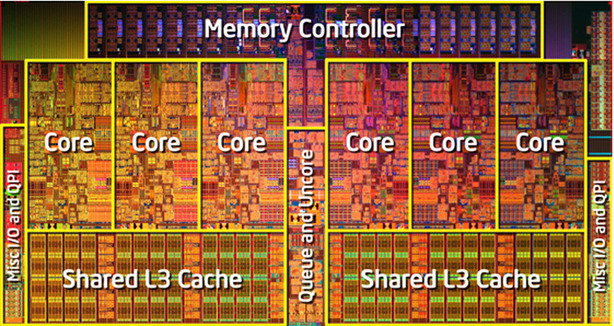
Il peut être utile de connaître le nombre de cœur de votre processeur afin d’optimiser vos applications utilisant des processus légers.
On peut obtenir aussi les information des caches associés au CPU.
Prérequis :
– Savoir lire du C++
Explications :
Voici le fichier d’en-tête CPUInfo.h :
|
1 2 3 4 5 6 7 8 9 10 11 12 13 14 15 16 17 18 19 20 21 22 23 24 25 26 27 28 29 30 31 32 33 34 35 36 37 38 39 40 41 42 43 44 45 46 47 48 |
#ifndef CPU_INFO_H #define CPU_INFO_H #include <Windows.h> #include <iostream> #include "Defines.h" #include "Types.h" typedef bool (WINAPI *LPFN_GLPI)(PSYSTEM_LOGICAL_PROCESSOR_INFORMATION, PDWORD); class CPUInfo { public: CPUInfo(); virtual ~CPUInfo(); bool Initialize(); uint16 GetLogicalProcessorCount(); uint16 GetPhysicalProcessorCount(); uint16 GetSystemProcessorCount(); uint16 GetL1CacheCount(); uint16 GetL2CacheCount(); uint16 GetL3CacheCount(); private: void ParseSystemProcessorCount(); bool ParseProcessorData(); uint32 CountBits(uint64 bitMask); private: uint16 m_iPhysicalProcessorCount; uint16 m_iLogicalProcessorCount; uint16 m_iProcessorCoreCount; uint16 m_iProcessorL1CacheCount; uint16 m_iProcessorL2CacheCount; uint16 m_iProcessorL3CacheCount; size_t m_iProcessorL1CacheSize; size_t m_iProcessorL2CacheSize; size_t m_iProcessorL3CacheSize; }; #endif |
Voici le fichier source CPUInfo.cpp :
|
1 2 3 4 5 6 7 8 9 10 11 12 13 14 15 16 17 18 19 20 21 22 23 24 25 26 27 28 29 30 31 32 33 34 35 36 37 38 39 40 41 42 43 44 45 46 47 48 49 50 51 52 53 54 55 56 57 58 59 60 61 62 63 64 65 66 67 68 69 70 71 72 73 74 75 76 77 78 79 80 81 82 83 84 85 86 87 88 89 90 91 92 93 94 95 96 97 98 99 100 101 102 103 104 105 106 107 108 109 110 111 112 113 114 115 116 117 118 119 120 121 122 123 124 125 126 127 128 129 130 131 132 133 134 135 136 137 138 139 140 141 142 143 144 145 146 147 148 149 150 151 152 153 154 155 156 157 158 159 160 161 162 163 164 165 166 167 168 169 170 171 172 173 174 175 176 177 178 179 180 181 182 183 184 185 186 187 188 189 190 |
#include "CPUInfo.h" CPUInfo::CPUInfo() : m_iProcessorCoreCount(0), m_iPhysicalProcessorCount(0), m_iLogicalProcessorCount(0), m_iProcessorL1CacheCount(0), m_iProcessorL2CacheCount(0), m_iProcessorL3CacheCount(0), m_iProcessorL1CacheSize(0), m_iProcessorL2CacheSize(0), m_iProcessorL3CacheSize(0) { } CPUInfo::~CPUInfo() { } bool CPUInfo::Initialize() { if (!ParseProcessorData()) { return false; } ParseSystemProcessorCount(); return true; } bool CPUInfo::ParseProcessorData() { m_iLogicalProcessorCount = 0; m_iPhysicalProcessorCount = 0; LPFN_GLPI Glpi; Glpi = (LPFN_GLPI) GetProcAddress(GetModuleHandle(TEXT("kernel32")), "GetLogicalProcessorInformation"); if (Glpi == nullptr) { /* La fonction qui permet d'obtenir les informations du CPU n'est pas supportée */ return false; } bool bDone = false; PSYSTEM_LOGICAL_PROCESSOR_INFORMATION pBuffer = nullptr; DWORD iReturnLength = 0; while (!bDone) { bool bSucess = Glpi(pBuffer, &iReturnLength); if (!bSucess) { if (GetLastError() == ERROR_INSUFFICIENT_BUFFER) { if (pBuffer) { free(pBuffer); } pBuffer = (PSYSTEM_LOGICAL_PROCESSOR_INFORMATION) malloc(iReturnLength); if (pBuffer == nullptr) { // Echec de l'allocation return false; } } else { // Erreur inconnu return false; } } else { bDone = true; } } DWORD iByteOffset = 0; PSYSTEM_LOGICAL_PROCESSOR_INFORMATION ptr = pBuffer; PCACHE_DESCRIPTOR pCache = nullptr; while (iByteOffset + sizeof(SYSTEM_LOGICAL_PROCESSOR_INFORMATION) <= iReturnLength) { switch (ptr->Relationship) { case RelationProcessorCore: { // Nombre de processeurs physiques m_iPhysicalProcessorCount++; // Nombre de processeurs logiques (ceux utilisable par le système) m_iLogicalProcessorCount += CountBits(ptr->ProcessorMask); break; } case RelationCache: { pCache = &ptr->Cache; if (pCache->Level == 1) { m_iProcessorL1CacheCount++; m_iProcessorL1CacheSize = pCache->Size; } else if (pCache->Level == 2) { m_iProcessorL2CacheCount++; m_iProcessorL2CacheSize = pCache->Size; } else if (pCache->Level == 3) { m_iProcessorL3CacheCount++; m_iProcessorL3CacheSize = pCache->Size; } break; } } iByteOffset += sizeof(SYSTEM_LOGICAL_PROCESSOR_INFORMATION); ptr++; } free (pBuffer); return true; } uint32 CPUInfo::CountBits(uint64 bitMask) { DWORD c = 0; while (bitMask != 0) { c += (bitMask & 1L); bitMask >>= 1; } return c; } void CPUInfo::ParseSystemProcessorCount() { SYSTEM_INFO si; GetSystemInfo(&si); m_iProcessorCoreCount = (uint16) si.dwNumberOfProcessors; } uint16 CPUInfo::GetSystemProcessorCount() { return m_iProcessorCoreCount; } uint16 CPUInfo::GetPhysicalProcessorCount() { return m_iPhysicalProcessorCount; } uint16 CPUInfo::GetLogicalProcessorCount() { return m_iLogicalProcessorCount; } uint16 CPUInfo::GetL1CacheCount() { return m_iProcessorL1CacheCount; } uint16 CPUInfo::GetL2CacheCount() { return m_iProcessorL2CacheCount; } uint16 CPUInfo::GetL3CacheCount() { return m_iProcessorL3CacheCount; } |
Résumé :
Nous avons présenter une méthode pour obtenir le nombre de cœur(s) de votre CPU.
Références :
– http://blogs.media-tips.com/bernard.opic/2007/09/03/compter-le-nombre-de-1-dans-la-forme-binaire-d-un-nombre/
– https://msdn.microsoft.com/fr-fr/library/windows/desktop/ms683194%28v=vs.85%29.aspx