

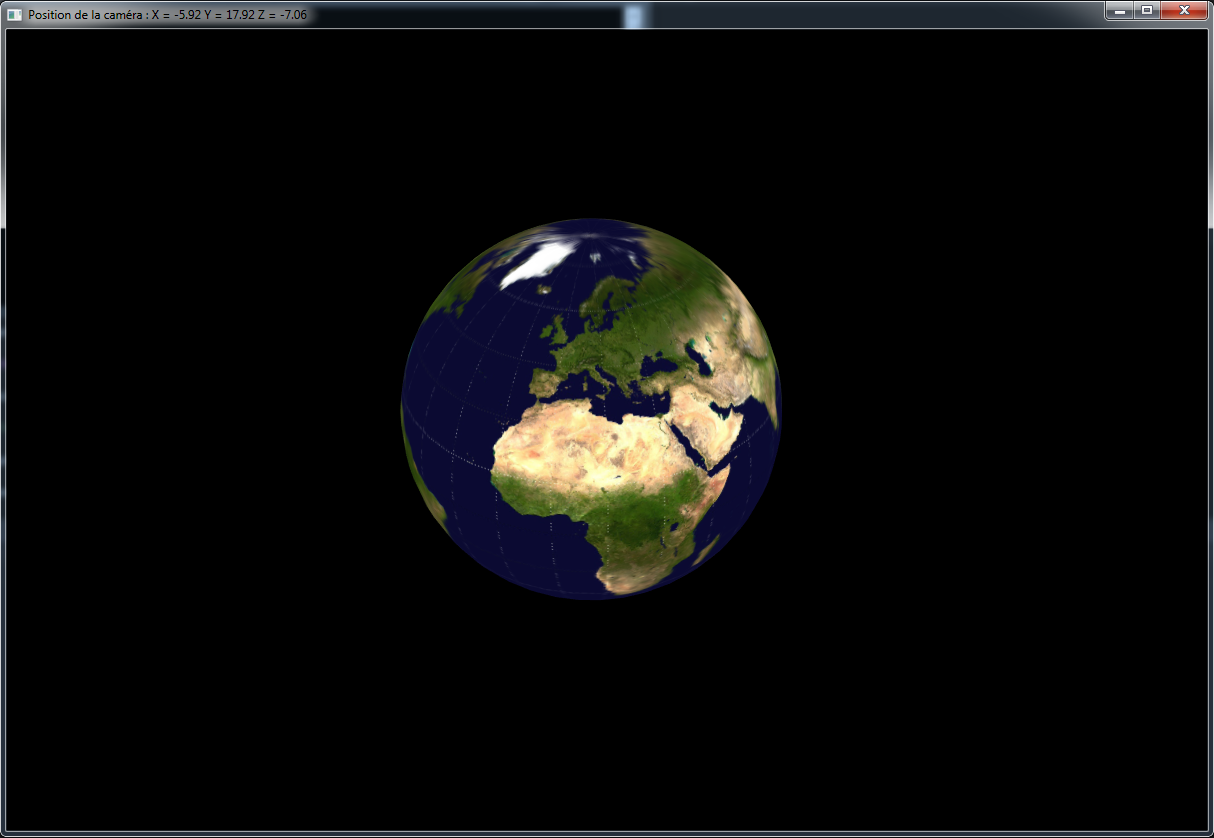
Intro :
Il peut être utile de savoir générer une sphère à la volée par la définition de ses vertices et de ses indices.
Prérequis :
– Savoir lire du C++
– Savoir initialiser DirectX 10
– Savoir utiliser et comprendre un peu de trigonométrie
– Savoir utiliser la classe Renderable
– Savoir utiliser la classe MeshSceneNode
– Savoir utiliser la classe ShaderTechnique
Explications :
Voici l’implémentation de la classe shader :
|
1 2 3 4 5 6 7 8 9 10 11 12 13 14 15 16 17 18 |
//------------------------------------------------------ // Simple shader avec texturage //------------------------------------------------------ class ShaderTechnique_BasicTexture : public ShaderTechnique { public: ShaderTechnique_BasicTexture(const std::string& sTextureFileName); virtual ~ShaderTechnique_BasicTexture(); virtual bool Initialize(); virtual void SetupShaderVariables(); virtual void Update(float fTimeSinceLastFrame); private: std::string m_sTextureFileName; }; |
Voici le fichier ShaderTechnique_BasicTexture.cpp :
|
1 2 3 4 5 6 7 8 9 10 11 12 13 14 15 16 17 18 19 20 21 22 23 24 25 26 27 28 29 30 31 32 33 34 35 36 37 38 39 40 41 42 43 44 45 46 47 48 49 50 51 52 |
#include "ShaderTechnique_Declarations.h" ShaderTechnique_BasicTexture::ShaderTechnique_BasicTexture(const std::string& sTextureFileName) : ShaderTechnique("SimpleTextureEffect.fx", "Render", VertexLayoutType::PTN_VERTEX), m_sTextureFileName(sTextureFileName) { } ShaderTechnique_BasicTexture::~ShaderTechnique_BasicTexture() { } bool ShaderTechnique_BasicTexture::Initialize() { if (ShaderTechnique::Initialize() == false) { return false; } SetupShaderVariables(); return true; } void ShaderTechnique_BasicTexture::SetupShaderVariables() { RegisterMatrixVariable("World", ShaderVariableType::WORLD); RegisterMatrixVariable("View", ShaderVariableType::VIEW); RegisterMatrixVariable("Projection", ShaderVariableType::PROJECTION); RegisterTextureVariable("txDiffuse"); AddTexture(m_sTextureFileName.c_str()); SetTexture("txDiffuse", 0); } void ShaderTechnique_BasicTexture::Update(float fTimeSinceLastFrame) { // On fait tourner la sphère / planète D3DXMATRIX mat; static float r = 0.0f; r += fTimeSinceLastFrame * 0.3f; D3DXMatrixRotationY(&mat, r); SetMatrix("World", &mat); SetAutoMatrix(ShaderVariableType::VIEW); SetAutoMatrix(ShaderVariableType::PROJECTION); } |
Voici le fichier SphereMeshSceneNode.h :
|
1 2 3 4 5 6 7 8 9 10 11 12 13 14 15 16 17 18 19 |
#ifndef SPHERE_MESH_SCENE_NODE_H #define SPHERE_MESH_SCENE_NODE_H #include "MeshSceneNode.h" #include "Types.h" class SphereMeshSceneNode : public MeshSceneNode { public: SphereMeshSceneNode(); virtual ~SphereMeshSceneNode(); void CreateSphere(uint16 iRings, uint16 iSectors, uint16 iRadius); private: }; #endif |
Voici le fichier SphereMeshSceneNode.cpp :
|
1 2 3 4 5 6 7 8 9 10 11 12 13 14 15 16 17 18 19 20 21 22 23 24 25 26 27 28 29 30 31 32 33 34 35 36 37 38 39 40 41 42 43 44 45 46 47 48 49 50 51 52 53 54 55 56 57 58 59 60 61 62 63 64 65 66 67 68 69 |
#include <vector> #include "SphereMeshSceneNode.h" #include "Types.h" #include "ShaderTechnique_Declarations.h" SphereMeshSceneNode::SphereMeshSceneNode() { // Chercher sur Google Image d'autres textures sphériques SetShaderTechnique( new ShaderTechnique_BasicTexture("earth.jpg") ); CreateSphere(40, 40, 4); } SphereMeshSceneNode::~SphereMeshSceneNode() { } // Voilà la méthode qui créer la sphère void SphereMeshSceneNode::CreateSphere(uint16 iRings, uint16 iSectors, uint16 iRadius) { std::vector<PTNVertex> vertices; std::vector<uint16> indices; float R = 1.f/(float)(iRings-1); float S = 1.f/(float)(iSectors-1); for (uint32 r = 0; r < iRings; r++) { for (uint32 s = 0; s < iSectors; s++) { #define MATH_PI 3.141592653589793f #define MATH_PI_2 MATH_PI / 2 float const y = sin( -MATH_PI_2 + MATH_PI * r * R ); float const x = cos(2*MATH_PI * s * S) * sin( MATH_PI * r * R ); float const z = sin(2*MATH_PI * s * S) * sin( MATH_PI * r * R ); PTNVertex v; v.position.x = x * iRadius; v.position.y = y * iRadius; v.position.z = z * iRadius; v.texture.x = 1 - s*S; v.texture.y = r*R; v.normal.x = -x; v.normal.y = -y; v.normal.z = -z; vertices.push_back(v); } } for (uint16 y = 0; y < iRings - 1; y++) { for (uint16 x = 0; x < iSectors - 1; x++) { indices.push_back( ((y + 0) * iSectors + x) ); indices.push_back( ((y + 1) * iSectors + x) ); indices.push_back( ((y + 1) * iSectors + x + 1) ); indices.push_back( ((y + 1) * iSectors + x + 1) ); indices.push_back( ((y + 0) * iSectors + x + 1) ); indices.push_back( ((y + 0) * iSectors + x) ); } } Build(vertices, indices); } |
Résumé :
Nous avons appris comment générer une sphère en 3D avec ses coordonnées de texture et normales.
Référénces :
– http://stackoverflow.com/questions/5988686/creating-a-3d-sphere-in-opengl-using-visual-c