


Intro :
Dans cette cinquième partie, nous allons apprendre comment afficher une image 2D à l’écran.
Nous proposerons deux façon d’implémenter cet affichage.
Prérequis :
Avoir suivi la cinquième partie de ce tutoriel.
Quatrième partie :
Afficher une image 2D à l’écran.
Explications (1ère façon plus simple, sans utiliser de shader) :
Voici le fichier Sprite2D.h :
|
1 2 3 4 5 6 7 8 9 10 11 12 13 14 15 16 17 18 19 20 21 22 23 24 25 26 27 28 29 30 31 32 33 34 35 36 37 38 39 40 41 |
#ifndef SPRITE_2D_H #define SPRITE_2D_H #include <d3dx10.h> #include <string> class Sprite2D { public: Sprite2D(ID3D10Device* pDevice, WCHAR* sTextureFilename, int iImageWidth, int iImageHeight); virtual ~Sprite2D(); bool Initialize(); void Render(); void SetPosition(int iPosX, int iPosY); private: bool Update(); ID3D10Device* m_pDevice; int m_iImageWidth; int m_iImageHeight; int m_iPosX; int m_iPosY; ID3D10ShaderResourceView* m_pTextureRessourceView; std::wstring m_sTextureFilename; D3DX10_SPRITE m_pSpriteDesc; ID3DX10Sprite* m_pSprite; ID3D10Texture2D* m_pTexture;; D3DXMATRIX m_matProjection; }; #endif |
Voici le constructeur de la classe Sprite2D :
|
1 2 3 4 5 6 7 8 9 10 11 12 13 14 15 16 17 18 |
Sprite2D::Sprite2D(ID3D10Device* pDevice, WCHAR* sTextureFilename, int iImageWidth, int iImageHeight) : m_pSprite(nullptr), m_pTexture(nullptr), m_pTextureRessourceView(nullptr), m_sTextureFilename(sTextureFilename), m_pDevice(pDevice), m_iPosX(0), m_iPosY(0), m_iImageWidth(iImageWidth), m_iImageHeight(iImageHeight) { if (!Initialize()) { MessageBoxA(NULL, "Erreur d'initialisation d'un Sprite !", "Erreur", MB_ICONHAND | MB_OK); } } |
Voici la méthode d’initialisation :
|
1 2 3 4 5 6 7 8 9 10 11 12 13 14 15 16 17 18 19 20 21 22 23 24 25 26 27 28 29 30 31 32 33 34 35 36 37 38 39 40 41 42 43 44 45 46 47 |
bool Sprite2D::Initialize() { HRESULT hr = D3DX10CreateTextureFromFile(m_pDevice, m_sTextureFilename.c_str(), nullptr, nullptr, (ID3D10Resource**)&m_pTexture, nullptr); if (FAILED(hr)) { return false; } hr = m_pDevice->CreateShaderResourceView((ID3D10Resource*)m_pTexture, nullptr, &m_pTextureRessourceView); if (FAILED(hr)) { return false; } ZeroMemory(&m_pSpriteDesc, sizeof(D3DX10_SPRITE)); m_pSpriteDesc.pTexture = m_pTextureRessourceView; m_pSpriteDesc.TexCoord.x = 0; m_pSpriteDesc.TexCoord.y = 0; m_pSpriteDesc.TexSize.x = 1.0f; m_pSpriteDesc.TexSize.y = 1.0f; m_pSpriteDesc.TextureIndex = 0; m_pSpriteDesc.ColorModulate = D3DXCOLOR(1.0f, 1.0f, 1.0f, 1.0f); hr = D3DX10CreateSprite(m_pDevice, 0, &m_pSprite); if (FAILED(hr)) { return false; } D3DXMatrixOrthoOffCenterLH(&m_matProjection, 0.0f, D3D10_RENDERER->GetViewportWidth(), 0.0f, D3D10_RENDERER->GetViewportHeight(), 0.1f, 10); hr = m_pSprite->SetProjectionTransform(&m_matProjection); if (FAILED(hr)) { return false; } Update(); return true; } |
Voici les autres méthodes :
|
1 2 3 4 5 6 7 8 9 10 11 12 13 14 15 16 17 18 19 20 21 22 23 24 25 26 27 28 29 30 31 32 33 34 |
void Sprite2D::Render() { m_pSprite->Begin(D3DX10_SPRITE_SORT_TEXTURE | D3DX10_SPRITE_SAVE_STATE); m_pSprite->DrawSpritesImmediate(&m_pSpriteDesc, 1, 0, 0); m_pSprite->End(); } bool Sprite2D::Update() { float fSpritePosX = m_iPosX; float fSpritePosY = m_iPosY; float fSpriteWidth = m_iImageWidth; float fSpriteHeight = m_iImageHeight; D3DXMATRIX matTranslation; D3DXMatrixTranslation(&matTranslation, (fSpriteWidth / 2) + fSpritePosX, (fSpriteHeight / 2) + fSpritePosY, 0.1); D3DXMATRIX matScaling; D3DXMatrixScaling(&matScaling, fSpriteWidth, fSpriteHeight, 1.0f); m_pSpriteDesc.matWorld = matScaling * matTranslation; return true; } void Sprite2D::SetPosition(int iPosX, int iPosY) { m_iPosX = iPosX; m_iPosY = iPosY; Update(); } |
Explications (2ème façon plus compliquée, en utilisant un shader) :
Mettre dans un fichier Sprite2D.h :
|
1 2 3 4 5 6 7 8 9 10 11 12 13 14 15 16 17 18 19 20 21 22 23 24 25 26 27 28 29 30 31 32 33 34 35 36 37 38 39 40 41 42 43 44 45 46 47 48 49 50 51 52 53 54 55 56 57 58 59 60 61 62 63 64 65 66 67 68 69 |
#ifndef SPRITE_2D #define SPRITE_2D #include <d3dx10.h> #include <string> class Sprite2D { public: // La structure du rectangle à afficher struct VertexType { D3DXVECTOR3 position; D3DXVECTOR2 texture; }; Sprite2D(ID3D10Device* pDevice, WCHAR* sTextureFilename, int iImageWidth, int iImageHeight); virtual ~Sprite2D(); bool Initialize(); void Render(); void SetPosition(int iPosX, int iPosY); private: // Met à jour la dimension du quad texturé bool Update(); ID3D10Device* m_pDevice; ID3D10Buffer* m_pVertexBuffer; ID3D10Buffer* m_pIndexBuffer; int m_iVertexCount; int m_iIndexCount; int m_iScreenWidth; int m_iScreenHeight; int m_iImageWidth; int m_iImageHeight; /* Position de l'image */ int m_iPosX; int m_iPosY; int m_iPreviousPosX; int m_iPreviousPosY; ID3D10ShaderResourceView* m_pTexture; ID3D10EffectShaderResourceVariable* m_pTextureVariable; ID3D10Effect* m_pEffect; ID3D10EffectTechnique* m_pTechnique; ID3D10InputLayout* m_pLayout; ID3D10EffectMatrixVariable* m_pWorldVariable; ID3D10EffectMatrixVariable* m_pViewVariable; ID3D10EffectMatrixVariable* m_pProjectionVariable; D3DXMATRIX m_worldMatrix; D3DXMATRIX m_viewMatrix; D3DXMATRIX m_orthoMatrix; // Le nom de la texture de l'image à afficher std::wstring m_sTextureFilename; }; #endif |
Créer un fichier Sprite2D.cpp où vous metterez :
|
1 2 3 4 5 6 7 8 9 10 11 12 13 14 15 16 17 18 19 20 21 22 23 24 25 26 27 28 29 30 31 32 33 34 35 36 37 38 39 40 41 42 43 44 45 46 47 48 49 50 51 52 53 54 55 56 57 58 59 60 61 62 63 64 65 66 67 68 69 70 71 72 73 74 75 76 77 78 79 80 81 82 83 84 85 86 87 88 89 90 91 92 93 94 95 96 97 98 99 100 101 102 103 104 105 106 107 108 109 110 111 112 113 114 115 116 117 |
bool Sprite2D::Initialize() { // On prépare la matrice orthogonale, spécialement conçue pour // le rendu 2D. D3DXMatrixOrthoLH(&m_orthoMatrix, (float)m_iScreenWidth, (float)m_iScreenHeight, 1.0f, 20.0f); VertexType* arVertices; unsigned long* indices; D3D10_BUFFER_DESC vertexBufferDesc; D3D10_BUFFER_DESC indexBufferDesc; D3D10_SUBRESOURCE_DATA vertexData; D3D10_SUBRESOURCE_DATA indexData; HRESULT hr; m_iVertexCount = 6; m_iIndexCount = m_iVertexCount; arVertices = new VertexType[m_iVertexCount]; indices = new unsigned long[m_iIndexCount]; memset(arVertices, 0, (sizeof(VertexType) * m_iVertexCount)); for (unsigned int i = 0; i < m_iIndexCount; i++) { indices[i] = i; } vertexBufferDesc.Usage = D3D10_USAGE_DYNAMIC; vertexBufferDesc.ByteWidth = sizeof(VertexType) * m_iVertexCount; vertexBufferDesc.BindFlags = D3D10_BIND_VERTEX_BUFFER; vertexBufferDesc.CPUAccessFlags = D3D10_CPU_ACCESS_WRITE; vertexBufferDesc.MiscFlags = 0; vertexData.pSysMem = arVertices; // Créér le vertex buffer hr = m_pDevice->CreateBuffer(&vertexBufferDesc, &vertexData, &m_pVertexBuffer); if (FAILED(hr)) { return false; } indexBufferDesc.Usage = D3D10_USAGE_DEFAULT; indexBufferDesc.ByteWidth = sizeof(unsigned long) * m_iIndexCount; indexBufferDesc.BindFlags = D3D10_BIND_INDEX_BUFFER; indexBufferDesc.CPUAccessFlags = 0; indexBufferDesc.MiscFlags = 0; indexData.pSysMem = indices; // Créér l'index buffer hr = m_pDevice->CreateBuffer(&indexBufferDesc, &indexData, &m_pIndexBuffer); if (FAILED(hr)) { return false; } delete [] arVertices; arVertices = 0; delete [] indices; indices = 0; /********* Partie préparation du shader *********/ unsigned int numElements; D3D10_PASS_DESC passDesc; hr = D3DX10CreateEffectFromFile(L"Texture.fx", NULL, NULL, "fx_4_0", D3D10_SHADER_ENABLE_STRICTNESS, 0, m_pDevice, NULL, NULL, &m_pEffect, NULL, NULL); if (FAILED(hr)) { return false; } m_pTechnique = m_pEffect->GetTechniqueByName("TextureTechnique"); if (!m_pTechnique) { return false; } D3D10_INPUT_ELEMENT_DESC polygonLayout[] = { { "POSITION", 0, DXGI_FORMAT_R32G32B32_FLOAT, 0, 0, D3D10_INPUT_PER_VERTEX_DATA, 0 }, { "TEXCOORD", 0, DXGI_FORMAT_R32G32_FLOAT, 0, D3D10_APPEND_ALIGNED_ELEMENT, D3D10_INPUT_PER_VERTEX_DATA, 0 }, }; numElements = sizeof(polygonLayout) / sizeof(polygonLayout[0]); m_pTechnique->GetPassByIndex(0)->GetDesc(&passDesc); // Créér le vertex input layout hr = m_pDevice->CreateInputLayout(polygonLayout, numElements, passDesc.pIAInputSignature, passDesc.IAInputSignatureSize, &m_pLayout); if (FAILED(hr)) { return false; } m_pWorldVariable = m_pEffect->GetVariableByName("worldMatrix")->AsMatrix(); m_pViewVariable = m_pEffect->GetVariableByName("viewMatrix")->AsMatrix(); m_pProjectionVariable = m_pEffect->GetVariableByName("projectionMatrix")->AsMatrix(); m_pTextureVariable = m_pEffect->GetVariableByName("shaderTexture")->AsShaderResource(); // Créée la texture hr = D3DX10CreateShaderResourceViewFromFile(m_pDevice, m_sTextureFilename.c_str(), NULL, NULL, &m_pTexture, NULL); if (FAILED(hr)) { return false; } return true; } |
La fonction de rendu / d’affichage :
|
1 2 3 4 5 6 7 8 9 10 11 12 13 14 15 16 17 18 19 20 21 22 23 24 25 26 27 28 29 30 31 32 33 34 35 36 37 38 39 40 41 42 43 44 45 46 47 |
void Sprite2D::Render() { Update(); // On désactive le ZBuffer pour que l'image soit affichée devant // tous les rendus D3D10_RENDERER->EnableZBuffer(false); unsigned int stride = sizeof(VertexType); unsigned int offset = 0; // On prépare les matrices de transformation D3DXMatrixIdentity(&m_worldMatrix); D3DXMatrixIdentity(&m_viewMatrix); D3DXVECTOR3 Eye(0.0f, 0.0f, -1.0f); D3DXVECTOR3 At(0.0f, 0.0f, 0.0f); D3DXVECTOR3 Up(0.0f, 1.0f, 0.0f); D3DXMatrixLookAtLH(&m_viewMatrix, &Eye, &At, &Up); // Initialise les variables du shader m_pWorldVariable->SetMatrix((float*) &m_worldMatrix); m_pViewVariable->SetMatrix((float*) &m_viewMatrix); m_pProjectionVariable->SetMatrix((float*) &m_orthoMatrix); m_pTextureVariable->SetResource(m_pTexture); // Prépare le vertex input layout m_pDevice->IASetInputLayout(m_pLayout); // Prépare les vertex et index buffers pour être affichés m_pDevice->IASetVertexBuffers(0, 1, &m_pVertexBuffer, &stride, &offset); m_pDevice->IASetIndexBuffer(m_pIndexBuffer, DXGI_FORMAT_R32_UINT, 0); m_pDevice->IASetPrimitiveTopology(D3D10_PRIMITIVE_TOPOLOGY_TRIANGLELIST); // Affiche le quad texturé D3D10_TECHNIQUE_DESC techniqueDesc; m_pTechnique->GetDesc(&techniqueDesc); for(unsigned int i = 0; i < techniqueDesc.Passes; i++) { m_pTechnique->GetPassByIndex(i)->Apply(0); m_pDevice->DrawIndexed(m_iIndexCount, 0, 0); } D3D10_RENDERER->EnableZBuffer(true); } |
Ici la fonction de mise à jour de la position de l’image :
|
1 2 3 4 5 6 7 8 9 10 11 12 13 14 15 16 17 18 19 20 21 22 23 24 25 26 27 28 29 30 31 32 33 34 35 36 37 38 39 40 41 42 43 44 45 46 47 48 49 50 51 52 53 |
bool Sprite2D::Update() { float left, right, top, bottom; VertexType* arVertices; void* pVerticesPtr; HRESULT hr; // On calcul les coordonnées du quad en fonction de la position // de l'image left = (float)((m_iScreenWidth / 2) * -1) + (float)m_iPosX; right = left + (float)m_iImageWidth; top = (float)(m_iScreenHeight / 2) - (float)m_iPosY; bottom = top - (float)m_iImageHeight; arVertices = new VertexType[m_iVertexCount]; // Premier triangle arVertices[0].position = D3DXVECTOR3(left, top, 0.0f); // Top left. arVertices[0].texture = D3DXVECTOR2(0.0f, 0.0f); arVertices[1].position = D3DXVECTOR3(right, bottom, 0.0f); // Bottom right. arVertices[1].texture = D3DXVECTOR2(1.0f, 1.0f); arVertices[2].position = D3DXVECTOR3(left, bottom, 0.0f); // Bottom left. arVertices[2].texture = D3DXVECTOR2(0.0f, 1.0f); // Deuxième triangle arVertices[3].position = D3DXVECTOR3(left, top, 0.0f); // Top left. arVertices[3].texture = D3DXVECTOR2(0.0f, 0.0f); arVertices[4].position = D3DXVECTOR3(right, top, 0.0f); // Top right. arVertices[4].texture = D3DXVECTOR2(1.0f, 0.0f); arVertices[5].position = D3DXVECTOR3(right, bottom, 0.0f); // Bottom right. arVertices[5].texture = D3DXVECTOR2(1.0f, 1.0f); hr = m_pVertexBuffer->Map(D3D10_MAP_WRITE_DISCARD, 0, (void**)&pVerticesPtr); if (FAILED(hr)) { return false; } memcpy(pVerticesPtr, (void*)arVertices, (sizeof(VertexType) * m_iVertexCount)); m_pVertexBuffer->Unmap(); delete [] arVertices; arVertices = 0; return true; } |
Créez un fichier Texture.fx, où vous mettrez :
|
1 2 3 4 5 6 7 8 9 10 11 12 13 14 15 16 17 18 19 20 21 22 23 24 25 26 27 28 29 30 31 32 33 34 35 36 37 38 39 40 41 42 43 44 45 46 47 48 49 50 51 52 53 54 55 56 57 |
matrix worldMatrix; matrix viewMatrix; matrix projectionMatrix; Texture2D shaderTexture; SamplerState SampleType { Filter = MIN_MAG_MIP_LINEAR; AddressU = Wrap; AddressV = Wrap; }; struct VertexInputType { float4 position : POSITION; float2 tex : TEXCOORD0; }; struct PixelInputType { float4 position : SV_POSITION; float2 tex : TEXCOORD0; }; PixelInputType TextureVertexShader(VertexInputType input) { PixelInputType output; input.position.w = 1.0f; output.position = mul(input.position, worldMatrix); output.position = mul(output.position, viewMatrix); output.position = mul(output.position, projectionMatrix); output.tex = input.tex; return output; } float4 TexturePixelShader(PixelInputType input) : SV_Target { float4 textureColor; textureColor = shaderTexture.Sample(SampleType, input.tex); return textureColor; } technique10 TextureTechnique { pass pass0 { SetVertexShader(CompileShader(vs_4_0, TextureVertexShader())); SetPixelShader(CompileShader(ps_4_0, TexturePixelShader())); SetGeometryShader(NULL); } } |
Résumé :
Nous avons expliquées deux façon d’afficher du rendu 2D avec DirectX.
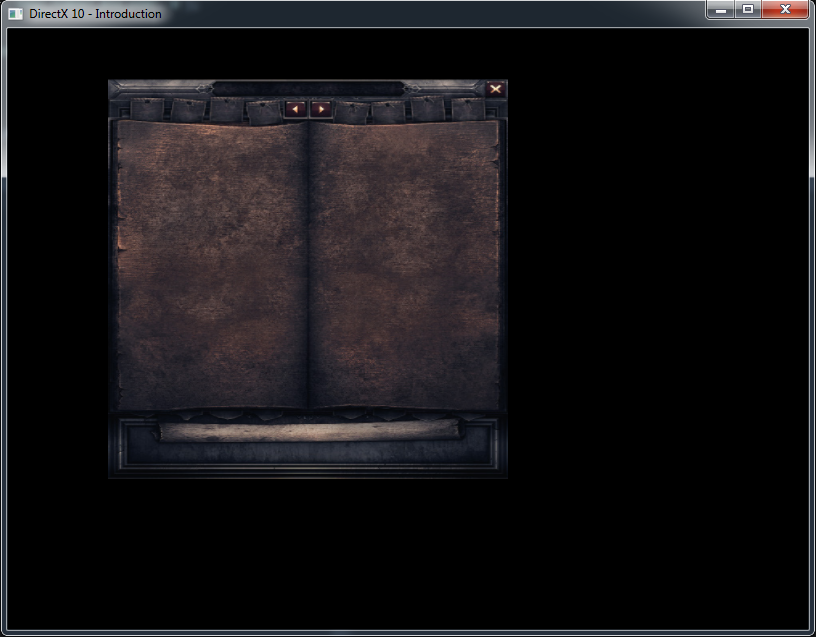
Nous nous servirons de cet affichage 2D pour implémenter une UI (Interface Utilisateur).
Références :
– http://mscerts.programming4.us/programming/directx%2010%20game%20programming%20%20%20the%202d%20resurgence%20-%20sprites.aspx